Dataflows Architecture
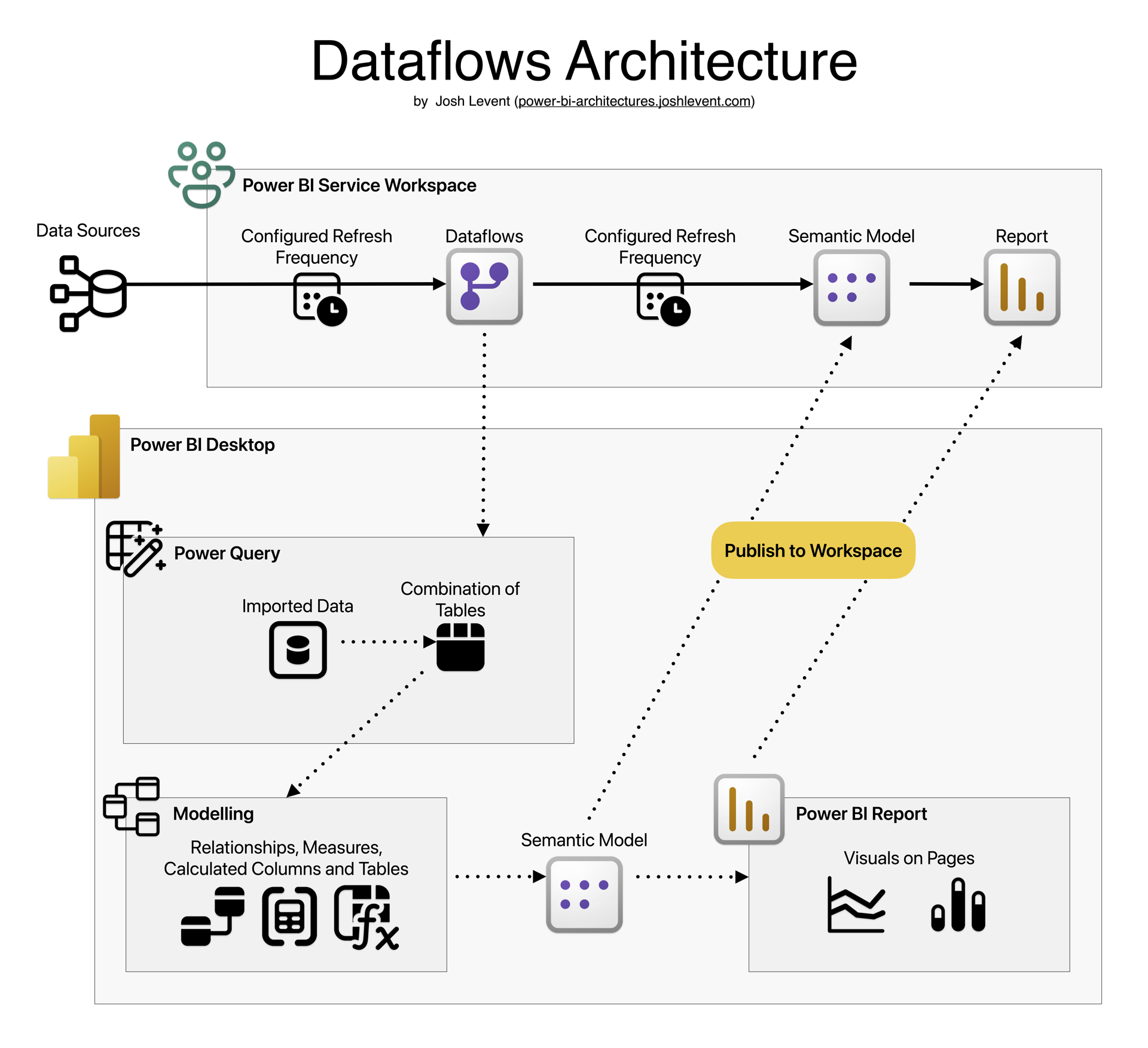
This Dataflows architecture is only a slight change from the basic architecture. It introduces one new element: Dataflows.
Dataflows are Power Query jobs in the Power BI Service that output tables the way Power Query does in Power BI Desktop. However those tables are cached objects in the Service which are available as sources for Power BI everywhere.
There are two reasons for upgrading from the basic architecture to this one. First, it allows you to split up the data preparation from the modelling and report building work, which makes it easier to split these tasks between different team members.
Secondly, by creating a different Dataflow for each data source, you can logically separate points of failure. If one data source is not responding to a refresh, this prevents the entire report from refreshing under the basic architecture. When this occurs with Dataflows, only the Dataflow that connects to that source will fail to refresh, but crucially, it will still provide the cached data to the Power BI report when that refreshes.
As with the basic architecture, the dotted lines indicate the path that data takes during report development. Publishing a report created in Power BI Desktop publishes both the semantic model and the report to the target Power BI Service Workspace.