Basic Power BI Architecture
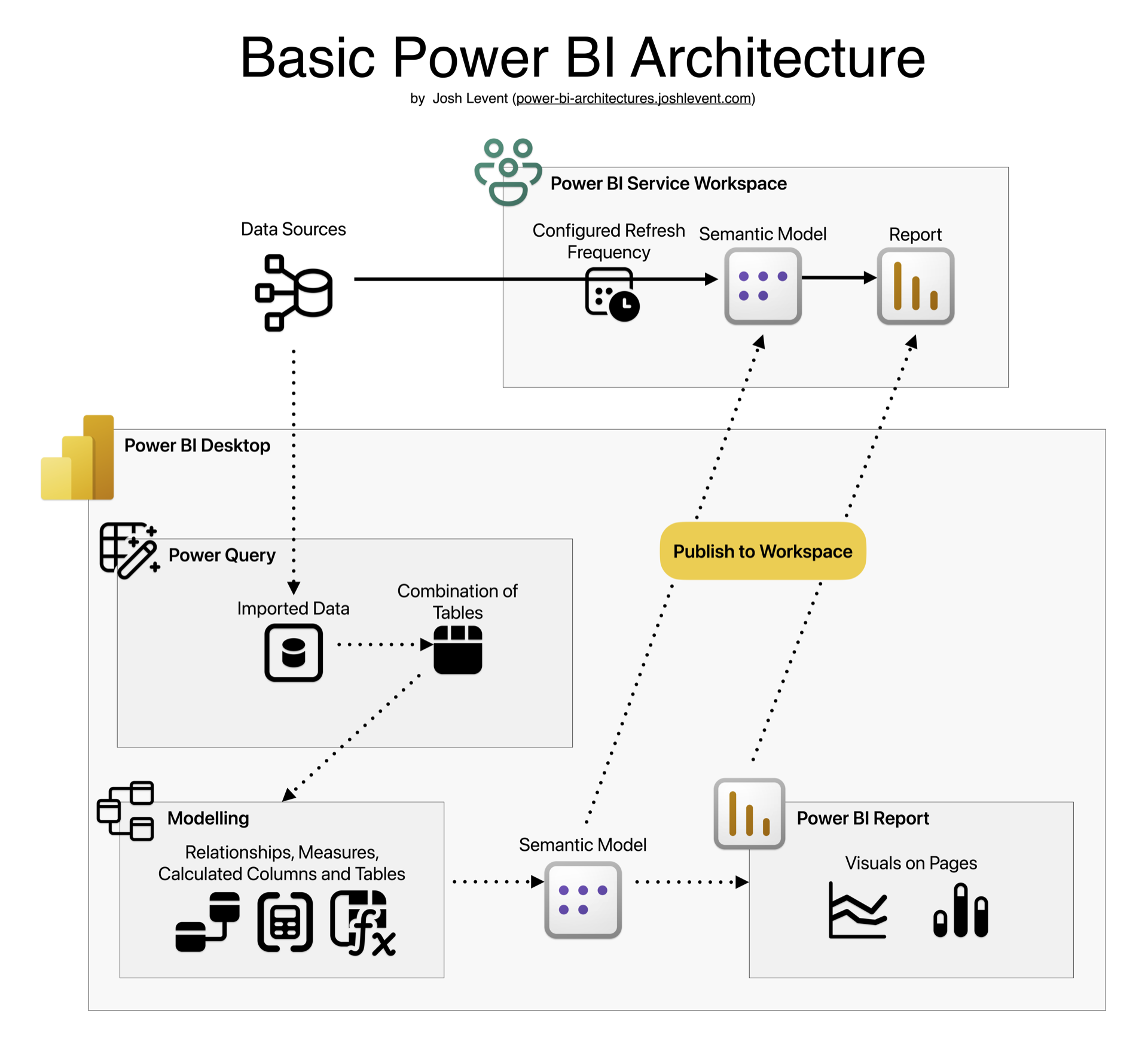
This basic architecture is what Power BI beginners learn and should practice, because it forms the basis for more complex architectures. (The diagram above is more detailed than my other architecture diagrams, which implicitly contain all of this.)
The dotted lines indicate the path that data takes during development. Publishing a report created in Power BI Desktop publishes both the semantic model and the report to the target Power BI Service Workspace.
During scheduled refreshes, data is pulled into the semantic model in the workspace by the Power Query code written in the Desktop application.
Within the workspace, you can continue to edit the semantic model and the report; however, Power Query code cannot be edited there (as of early 2025). Be cautious: editing in two different places makes it easy to overwrite existing work.
Unlike some of the more complex architectures, a single person can design and implement this end-to-end. Most of my students can do so after a five-day course.